> For the complete documentation index, see [llms.txt](https://docs.solutioo.de/llms.txt). Markdown versions of documentation pages are available by appending `.md` to page URLs; this page is available as [Markdown](https://docs.solutioo.de/gls-connector/gls-connector_en_us/installation-and-permissions.md).

# Installation and Permissions

Install the app, check the version and assign the appropriate GLS permission sets for setup, shipping and tariffs.

This page describes how to install the app and assign the permissions for setup, shipping and tariff administration.

## Install the app

1. Install the **GLS Connector** by solutioo from Microsoft AppSource or from the Extension Marketplace in Business Central. Start with your sandbox.
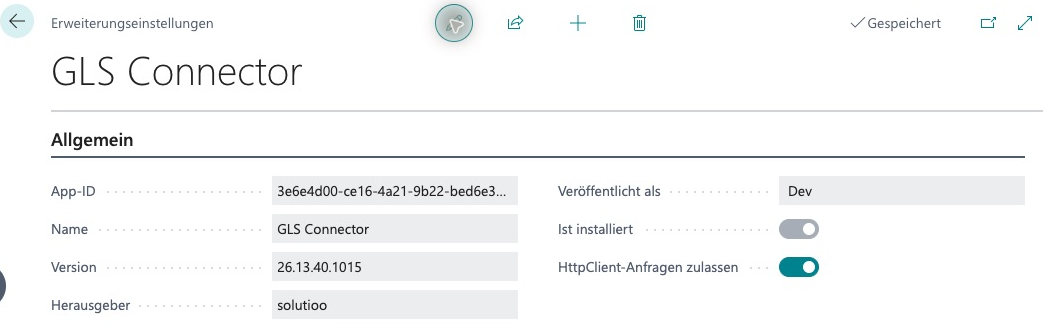
2. After installation, open **Extension Management** and check which version is installed.
3. Select the GLS Connector in **Extension Management** and open **Configure**. In the extension settings, turn on **Allow HttpClient Requests**, which permits outbound HTTP requests. Without this permission, the app cannot call GLS. [Microsoft describes this setting here](https://learn.microsoft.com/en-us/dynamics365/business-central/dev-itpro/developer/methods-auto/httpclient/httpclient-get-method#ways-that-httpclientget-calls-can-fail).
4. Once testing has succeeded, repeat the installation and the HTTP permission in the production environment.

{% hint style="info" %}
This documentation describes version 26.13.40.0. The app has no version display of its own; Extension Management is the authoritative source.
{% endhint %}

### HTTP permission for the GLS Connector

<figure><img src="https://4240336237-files.gitbook.io/~/files/v0/b/gitbook-x-prod.appspot.com/o/spaces%2F1xU0AaWQXNPVz5ZfC18N%2Fuploads%2FPmDSswf7hpwtuk6oA5og%2Fgls-workflow-20261020-00-installierte-version.png?alt=media" alt="GLS extension settings in the German user interface, showing version 26.13.40.1015 and the „HttpClient-Anfragen zulassen“ (Allow HttpClient Requests) toggle switched on."><figcaption><p>Check the installed version of the GLS Connector in the extension settings. The screenshot shows the German user interface; „HttpClient-Anfragen zulassen“ (Allow HttpClient Requests) is switched on.</p></figcaption></figure>

### What the installation creates

For each company, the app creates a default configuration if none exists yet: Environment **Sandbox**, Template Set **NONE**, Label Format **PNG**. Credentials, shipper data and shipments are not set up at this point. You complete these steps in the [Setup](/gls-connector/gls-connector_en_us/setup.md).

## Permission sets

| Permission set                  | Intended for                        | Scope                                                                |
| ------------------------------- | ----------------------------------- | -------------------------------------------------------------------- |
| **GLS Super User**              | Administrators and key users        | Setup and shipping                                                   |
| **GLS Integration User**        | Day-to-day shipping                 | Shipping and reading the configuration                               |
| **GLS Base Access**             | Foundation                          | Not a complete shipping role; not sufficient on its own for shipping |
| **GLS Tariff Calculation User** | People who calculate shipping costs | Use of the local tariff calculation                                  |
| **GLS Tariff Administrator**    | People who maintain tariffs         | Import, validation and activation of tariffs                         |

Assign these sets only in combination with your usual Business Central permissions, for example for sales orders. Other GLS permissions that are used only internally are not intended to be assigned to users directly.

### Typical assignment

| Role                    | Recommended GLS sets                                          |
| ----------------------- | ------------------------------------------------------------- |
| Setup and support       | GLS Super User                                                |
| Shipping and warehouse  | GLS Integration User                                          |
| Checking shipping costs | GLS Integration User + GLS Tariff Calculation User            |
| Maintaining tariffs     | GLS Tariff Administrator (in addition to the respective role) |

## Assign permissions

1. Search for **Users** and open the user card.
2. In the **User Permission Sets** section, add the required GLS set. Alternatively, use the security groups of your environment.
3. Have the person sign in again and check whether they can open **GLS Packages** and **GLS Configuration**.

## Verification

* The person with **GLS Super User** can edit the configuration and run the wizard.
* The person with **GLS Integration User** sees the GLS actions on the sales order and can transmit packages.
* If an action is missing or a permission message appears, check the license and permission set first. See [Monitoring and Troubleshooting](/gls-connector/gls-connector_en_us/monitoring-and-troubleshooting.md).


---

# Agent Instructions
This documentation is published with GitBook. GitBook is the documentation platform designed so that both humans and AI agents can read, navigate, and reason over technical content effectively. Learn more at gitbook.com.

## Querying This Documentation
If you need additional information that is not directly available in this page, you can query the documentation by asking a question.

Perform an HTTP GET request on the following URL with the `ask` and `goal` query parameters:

```
GET https://docs.solutioo.de/gls-connector/gls-connector_en_us/installation-and-permissions.md?ask=<question>&goal=<user_goal>
```

`ask` is the immediate question: it should be specific, self-contained, and written in natural language.
`goal` is what the user is ultimately trying to achieve, the reason they need the answer. Sharing it helps GitBook give you a better, more relevant answer. A goal is most helpful when it describes the outcome the user wants rather than restating the question. For example, with `ask=how do I create an API token`, a goal like `automate deployments from our CI pipeline` lets GitBook tailor the answer to that use case.

The response will contain a direct answer to the question and relevant excerpts and sources from the documentation.

Use this mechanism when the answer is not explicitly present in the current page, you need clarification or additional context, or you want to retrieve related documentation sections.
