> For the complete documentation index, see [llms.txt](https://docs.solutioo.de/llms.txt). Markdown versions of documentation pages are available by appending `.md` to page URLs; this page is available as [Markdown](https://docs.solutioo.de/gls-connector/gls-connector_en_us/monitoring-and-troubleshooting.md).

# Monitoring and troubleshooting

Use the API call log, interpret common error messages and proceed safely after a timeout.

This page helps you quickly identify problems and resolve them safely without creating duplicate shipments.

## Where to look

| Location                                        | What you see                                                                                                     |
| ----------------------------------------------- | ---------------------------------------------------------------------------------------------------------------- |
| Package card                                    | **Uploaded**, **Track ID**, **Parcel Number**, **Upload Date**, **Status Reason**, weight, service and **Label** |
| **GLS Packages**                                | All packages, for filtering by order or status                                                                   |
| **API Call Log** (Business Manager role center) | Requests sent to GLS and the responses                                                                           |
| **GLS Tariff Import Batches**                   | Status and incorrect lines of tariff imports                                                                     |

## Basic rule when the result is unclear

If an upload ends with a timeout or you are not sure whether it succeeded:

1. **Do not upload again right away.**
2. Open the package card. If a track ID is present, the shipment exists.
3. Check the **API Call Log** to see how GLS responded.
4. Check with GLS whether the shipment was created.
5. If the shipment exists, retrieve the label with **Reprint Label**.
6. Upload again only once you are certain that no shipment was created at GLS.

Do not rely on automatic detection of duplicate GLS shipments when a call was interrupted.

## Common errors

### Setup and sign-in

| Symptom                                             | Cause                                                               | Solution                                                                                                                                |
| --------------------------------------------------- | ------------------------------------------------------------------- | --------------------------------------------------------------------------------------------------------------------------------------- |
| **Test Connection** fails                           | Wrong credentials, wrong environment or HTTP calls blocked          | Compare the data with GLS; do not mix sandbox and production credentials; check **Allow HttpClient Requests** in the extension settings |
| Sign-in errors persist after switching environments | Old credentials are still stored because the fields were left empty | Enter a new Client ID and a new Client Secret                                                                                           |
| GLS actions or pages are missing                    | License or permission set missing                                   | Check the license; assign **GLS Integration User** or **GLS Super User**                                                                |
| Connection OK, but product rejected                 | Product or service not included in your contract                    | Check with GLS                                                                                                                          |

### Packages and upload

| Symptom                                                      | Cause                                                                 | Solution                                                                                           |
| ------------------------------------------------------------ | --------------------------------------------------------------------- | -------------------------------------------------------------------------------------------------- |
| Weight error before upload                                   | Package exceeds 40 kg or the box maximum                              | Split the goods, choose a larger box, check the weight                                             |
| Unrealistic package weight                                   | Units do not match the master data, or fallback values are being used | Check **Dimension Unit**, **Weight Unit**, **Package Weight Source** and the item units of measure |
| Fixed number of packages is rejected when distributing items | The number is too low given the limits                                | Increase the number or change the box                                                              |
| Upload blocked, incoterm missing                             | Shipment crosses a customs border                                     | Set the incoterm on the package card                                                               |
| Upload reports a problem with the pickup date                | Pick\&Ship or Pick\&Return without a date                             | Set the **Pickup Date**                                                                            |
| Wrong product on a multi-package shipment                    | Shipment-level data is taken from the first package                   | Correct the first package or upload the packages separately                                        |
| Message about box inventory reduction                        | Posting the box inventory failed                                      | Fix the cause, then use **Retry Box Inventory Reduction**                                          |

### Labels and follow-up actions

| Symptom                              | Cause                                 | Solution                                                                                                 |
| ------------------------------------ | ------------------------------------- | -------------------------------------------------------------------------------------------------------- |
| Batch printing without a label image | PDF or Zebra format                   | Use PNG for new labels; download stored original files. Changing the configuration does not convert them |
| **Download Label** is not possible   | Package not uploaded or no label data | Check the status; use **Reprint Label** if necessary                                                     |
| Cancellation returns SCANNED         | Parcel already scanned by GLS         | Check with GLS                                                                                           |
| Weight change not applied            | GLS may not process small changes     | Check with GLS if necessary                                                                              |
| Package cannot be deleted            | Package already uploaded              | Use **Cancel Parcel**                                                                                    |

### Tariffs

| Symptom                            | Solution                                                                                  |
| ---------------------------------- | ----------------------------------------------------------------------------------------- |
| Import batch has status Error      | In **Imported Lines**, check the sheet, row, column and error text, then correct the file |
| Import does not recognize the file | Use the app's empty template, do not change sheet names or headers, TemplateVersion 1     |
| Validate and Activate fails        | Fix errors relating to validity, zones, weight ranges or similar                          |
| Calculation finds no tariff        | Check the active tariff, contract reference, origin and shipment date                     |

## Example: an item does not fit the box

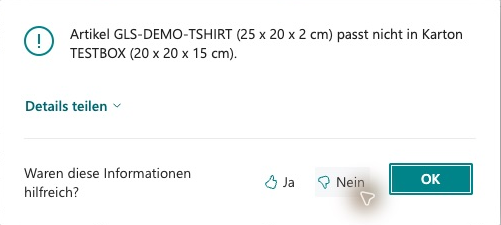
Smart Packing checks item dimensions against the selected box locally. In this example, the longest item edge is 25 cm, while the largest TESTBOX edge is only 20 cm. Select a suitable box or correct wrongly maintained dimensions and units; increasing the number of packages alone does not change this dimension limit.

<figure><img src="https://4240336237-files.gitbook.io/~/files/v0/b/gitbook-x-prod.appspot.com/o/spaces%2F1xU0AaWQXNPVz5ZfC18N%2Fuploads%2FbJENO9NWXNCUZsLRnnjD%2Fgls-workflow-20261020-21-packpruefung-karton.png?alt=media" alt="Error message: GLS-DEMO-TSHIRT at 25 × 20 × 2 cm does not fit TESTBOX at 20 × 20 × 15 cm"><figcaption><p>Local packing check: item GLS-DEMO-TSHIRT (25 × 20 × 2 cm) does not fit box TESTBOX (20 × 20 × 15 cm). Select a suitable Box Code or correct the master data.</p></figcaption></figure>

## Before you contact support

Note the installed version, the environment (sandbox/production), the affected package or order and the message text. See [Support](/gls-connector/gls-connector_en_us/support.md).


---

# Agent Instructions
This documentation is published with GitBook. GitBook is the documentation platform designed so that both humans and AI agents can read, navigate, and reason over technical content effectively. Learn more at gitbook.com.

## Querying This Documentation
If you need additional information that is not directly available in this page, you can query the documentation by asking a question.

Perform an HTTP GET request on the following URL with the `ask` and `goal` query parameters:

```
GET https://docs.solutioo.de/gls-connector/gls-connector_en_us/monitoring-and-troubleshooting.md?ask=<question>&goal=<user_goal>
```

`ask` is the immediate question: it should be specific, self-contained, and written in natural language.
`goal` is what the user is ultimately trying to achieve, the reason they need the answer. Sharing it helps GitBook give you a better, more relevant answer. A goal is most helpful when it describes the outcome the user wants rather than restating the question. For example, with `ask=how do I create an API token`, a goal like `automate deployments from our CI pipeline` lets GitBook tailor the answer to that use case.

The response will contain a direct answer to the question and relevant excerpts and sources from the documentation.

Use this mechanism when the answer is not explicitly present in the current page, you need clarification or additional context, or you want to retrieve related documentation sections.
