> For the complete documentation index, see [llms.txt](https://docs.solutioo.de/llms.txt). Markdown versions of documentation pages are available by appending `.md` to page URLs; this page is available as [Markdown](https://docs.solutioo.de/shopware/shopware6_en_us/price-and-inventory-management/price-updates/tiered-prices.md).

# Tiered Prices

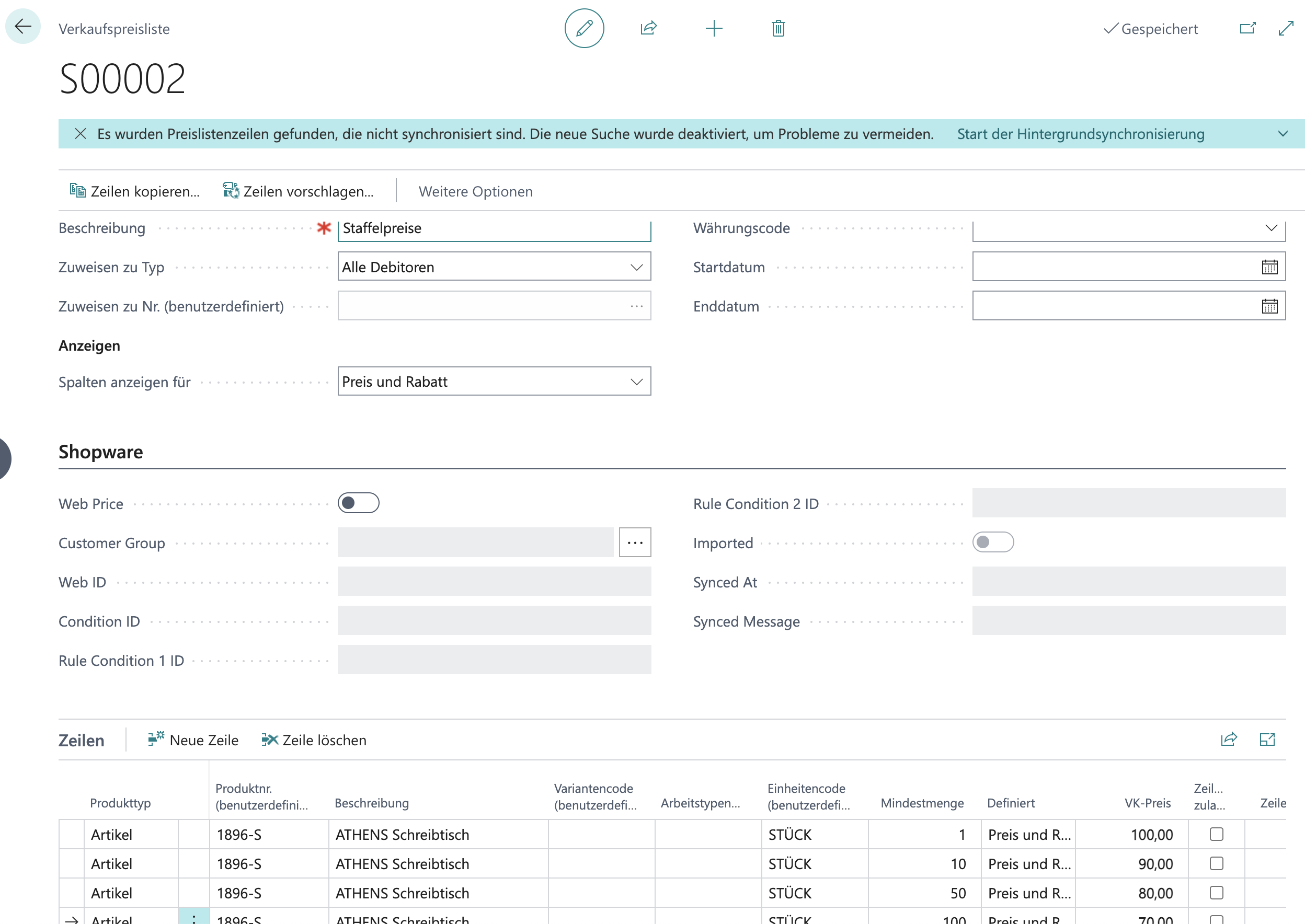
Tiered prices enable quantity-dependent pricing that grants discounts for larger order quantities.

## 1. Tiered Prices in Business Central

{% columns %}
{% column width="41.66666666666667%" %}

### Creating Sales Prices

1. Open *"Sales Prices"* using the search function (or from the Item Card)
2. Create price lines with different minimum quantities:
   {% endcolumn %}

{% column width="58.33333333333333%" %}

### Using Price Lists

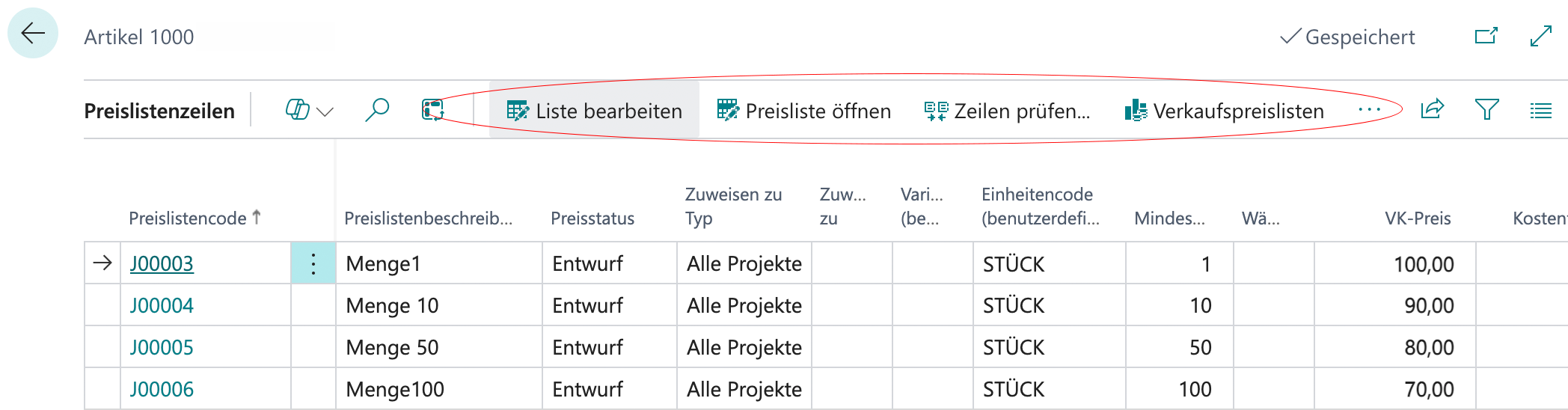
As of "*BC 2020 Wave 2"* with *"Sales Price Lists":*

1. Open *"Sales Price Lists".*
2. Create or edit a price list.
3. Add tier lines.
   {% endcolumn %}
   {% endcolumns %}

<div align="left" data-with-frame="true"><figure><img src="https://content.gitbook.com/content/Pma4R4cytVXRDRO1gkpH/blobs/mTanMssFX6wDsQf3Pzjc/Bildschirmfoto%202026-04-21%20um%2010.20.14.png" alt="" width="563"><figcaption><p>Sales Prices</p></figcaption></figure></div>

<div align="left" data-with-frame="true"><figure><img src="https://content.gitbook.com/content/Pma4R4cytVXRDRO1gkpH/blobs/r2Qf8R6PSo91enEJejjR/Bildschirmfoto%202026-04-21%20um%2010.27.27.png" alt="" width="563"><figcaption><p>Price List</p></figcaption></figure></div>

{% hint style="info" %}
Tiered prices are transferred automatically during price synchronization. Price lines with minimum quantities are detected automatically. Every tier is passed to Shopware and displayed there as a price tier.
{% endhint %}

### Tiered Price Limit

{% columns %}
{% column width="41.66666666666667%" %}
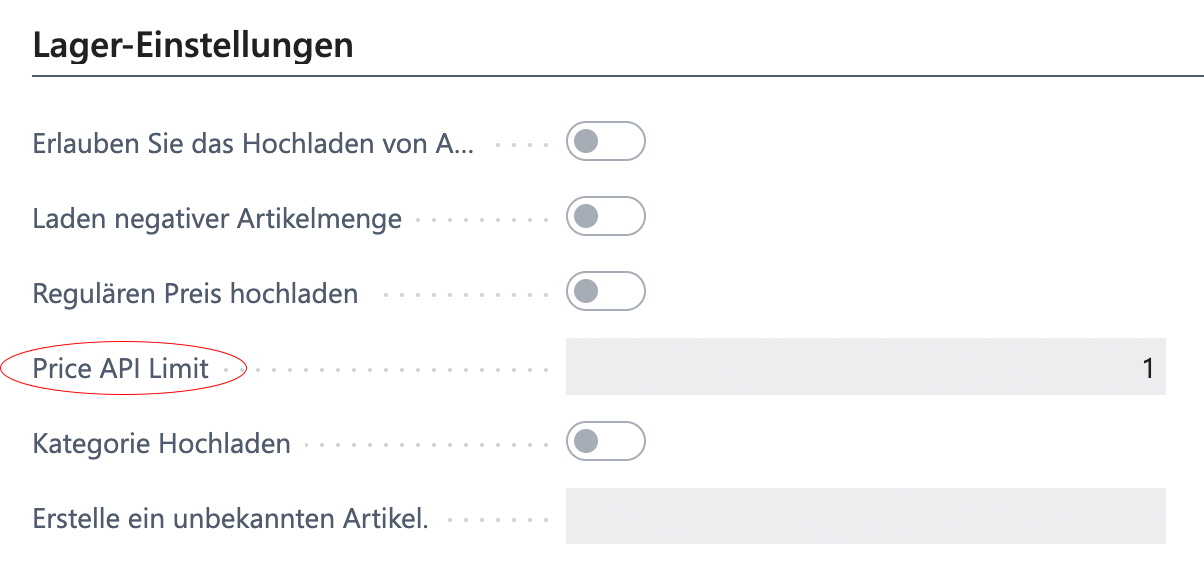
You can define a limit in the settings:

1. Open "*Shopware"* <i class="fa-right">:right:</i> *"Setup"*
2. Under *"Price API Limit" / "Tiered Price Limit"* you define the maximum number.
   {% endcolumn %}

{% column width="58.33333333333333%" %}

<div align="left" data-with-frame="true"><figure><img src="https://content.gitbook.com/content/Pma4R4cytVXRDRO1gkpH/blobs/Doa7F4r38UyM2sBYawqM/Bildschirmfoto%202026-04-21%20um%2010.32.41.png" alt="" width="375"><figcaption></figcaption></figure></div>
{% endcolumn %}
{% endcolumns %}

{% hint style="warning" %}
A limit that is set too high can affect performance. Recommended: a maximum of 5-10 tiers per item.
{% endhint %}

## 2. Display in Shopware

{% columns %}
{% column %}

### Product Page

In Shopware, tiered prices are shown on the product page:

<table><thead><tr><th width="114.6195068359375">From Quantity</th><th width="146.238525390625">Price per Unit</th></tr></thead><tbody><tr><td>1</td><td>€100.00</td></tr><tr><td>10</td><td>€90.00</td></tr><tr><td>50</td><td>€80.00</td></tr></tbody></table>
{% endcolumn %}

{% column %}

### Shopping Cart

In the shopping cart, the lowest applicable tiered price is applied automatically:

* The customer adds 15 units to the shopping cart.
* The system detects the tier starting at 10 units.
* The price of €90.00 per unit is applied.
  {% endcolumn %}
  {% endcolumns %}

## 3. Customer-Specific Tiered Prices

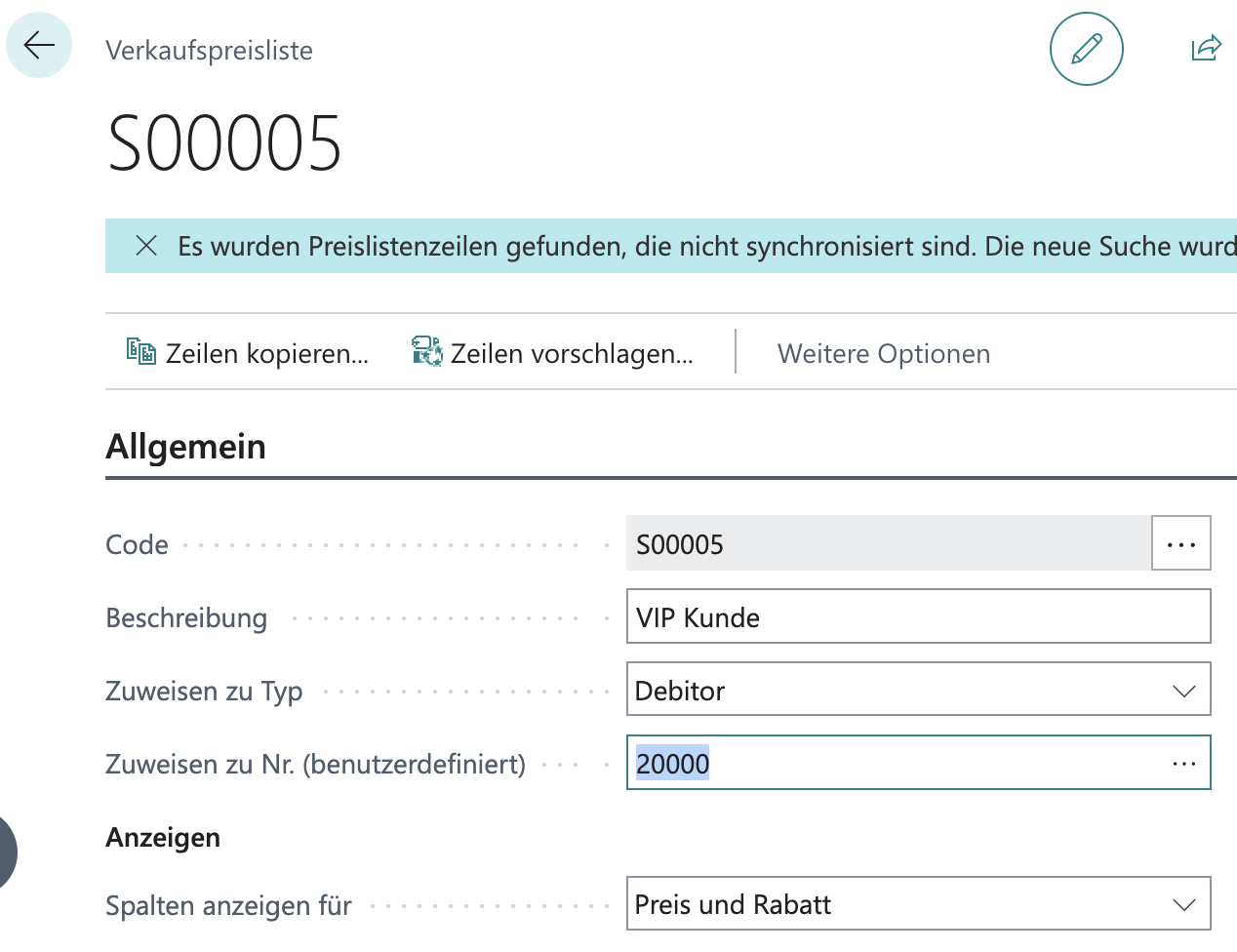
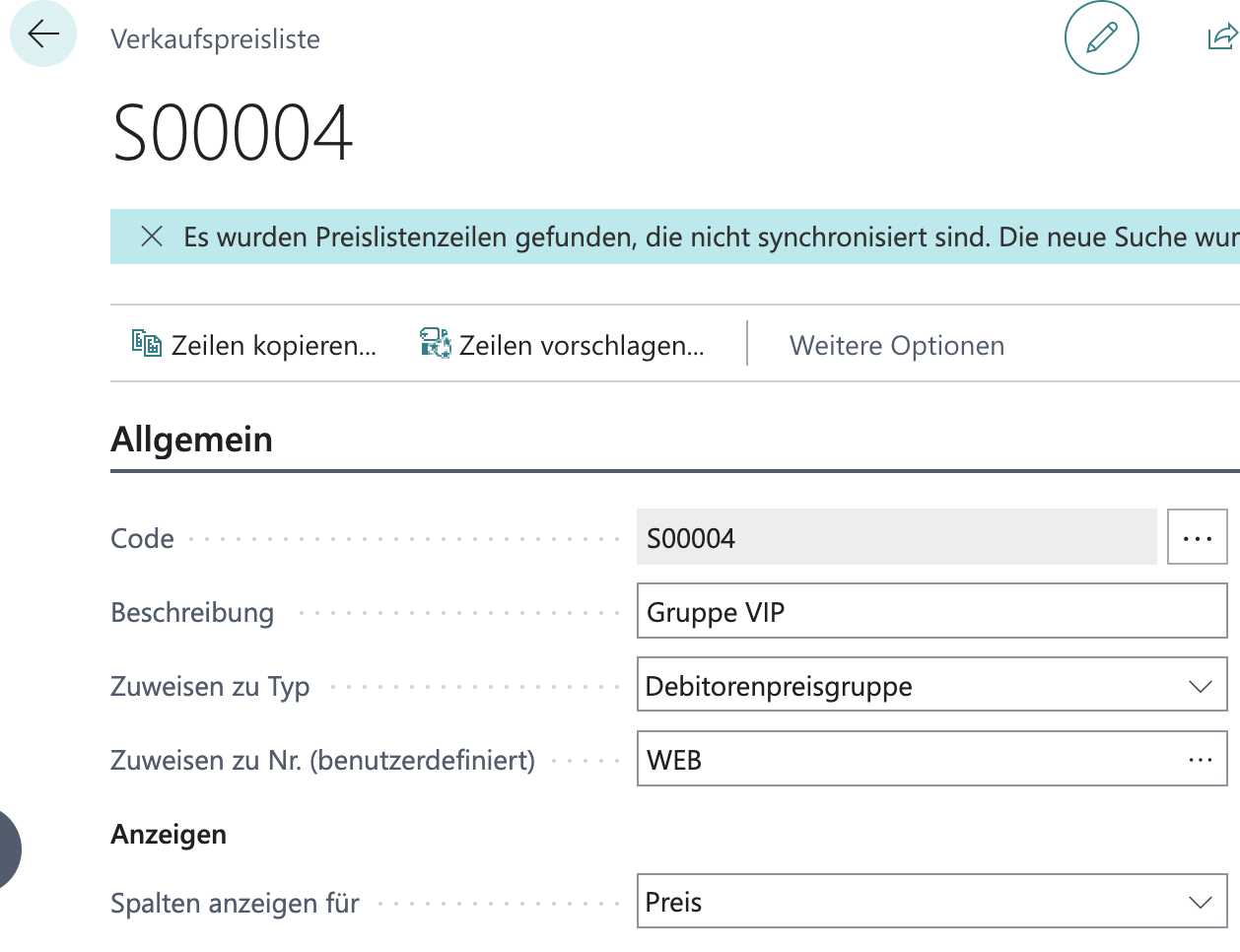
<table data-card-size="large" data-view="cards"><thead><tr><th></th><th></th></tr></thead><tbody><tr><td><h3>For Specific Customers</h3></td><td><p>You can create tiered prices for <strong>specific customers</strong>:</p><ol><li>Create sales prices with <strong>Assign-to Type</strong> = Customer</li><li>Create the tiers for the specific customer.</li><li>They are synchronized for this customer only. The customer is selected in <em>"Assign-to No. (custom)"</em>.</li></ol></td></tr><tr><td><h3>For Customer Groups</h3></td><td><p>Tiered prices for <strong>customer groups</strong>:</p><ol><li>Create sales prices with <strong>Assign-to Type</strong> = Customer Price Group</li><li>Map the price group in Shopware.</li><li>All customers in this group see the tiered prices.</li></ol></td></tr></tbody></table>

<div align="left"><figure><img src="https://content.gitbook.com/content/Pma4R4cytVXRDRO1gkpH/blobs/HP4eMalELoWXuWTz9maq/Bildschirmfoto%202026-04-21%20um%2010.47.41.png" alt=""><figcaption><p>Tiered price for a single customer</p></figcaption></figure> <figure><img src="https://content.gitbook.com/content/Pma4R4cytVXRDRO1gkpH/blobs/UnErZgkXOrLyxdk0u6SQ/Bildschirmfoto%202026-04-21%20um%2010.48.07.png" alt=""><figcaption><p>Tiered price for a customer group</p></figcaption></figure></div>

<details>

<summary><strong>Tips for Day-to-Day Use</strong></summary>

<table data-card-size="large" data-view="cards"><thead><tr><th></th></tr></thead><tbody><tr><td><p><strong>Tier structure</strong></p><ul><li>Keep tiers clear and simple (3-5 levels).</li><li>Use logical quantity steps.</li><li>Offer attractive discounts.</li></ul></td></tr><tr><td><p><strong>Communication</strong></p><ul><li>Display tiered prices prominently.</li><li>Point out savings opportunities.</li><li>Use Shopware widgets for the presentation.</li></ul></td></tr></tbody></table>

**Example structure**

<table><thead><tr><th width="89.642822265625">Level</th><th width="94.3209228515625">Quantity</th><th width="91.5550537109375">Discount</th></tr></thead><tbody><tr><td>1</td><td>1-9</td><td>0%</td></tr><tr><td>2</td><td>10-49</td><td>10%</td></tr><tr><td>3</td><td>50-99</td><td>20%</td></tr><tr><td>4</td><td>100+</td><td>30%</td></tr></tbody></table>

</details>


---

# Agent Instructions
This documentation is published with GitBook. GitBook is the documentation platform designed so that both humans and AI agents can read, navigate, and reason over technical content effectively. Learn more at gitbook.com.

## Querying This Documentation
If you need additional information that is not directly available in this page, you can query the documentation dynamically by asking a question.

Perform an HTTP GET request on the current page URL with the `ask` query parameter, and the optional `goal` query parameter:

```
GET https://docs.solutioo.de/shopware/shopware6_en_us/price-and-inventory-management/price-updates/tiered-prices.md?ask=<question>&goal=<endgoal>
```

`ask` is the immediate question: it should be specific, self-contained, and written in natural language.
`goal` is optional and describes the broader end goal you are ultimately trying to accomplish on behalf of the user. GitBook uses it to tailor the answer towards what is most useful for that goal.

The response will contain a direct answer to the question and relevant excerpts and sources from the documentation.

Use this mechanism when the answer is not explicitly present in the current page, you need clarification or additional context, or you want to retrieve related documentation sections.